PLANNING A TRIP WITH PINTEREST
This page may contain compensated links. For more information read our disclaimer here.
by Kristin Young | Updated On: June 19, 2019
Pinterest is my go-to resource for travel planning. I find that I get the best information from reading blogs, and Pinterest is a great place to find them. Plus, it keeps all your information in one place making it really easy to plan a trip with Pinterest.
If you’re unfamiliar with Pinterest, it’s an image-based search engine, and a phenomenal planning tool for travel (among other things). Once you create an account, you can search for topics or follow others with similar interests. Each photo, or “pin”, is usually linked to a corresponding website, and can be saved to boards that you create to keep your ideas organized.
I prefer to use blogs for my travel planning, as opposed to travel guides or Tripadvisor, because you usually get information about the author to see if they are similar to you. Reviews from 18-year-olds or 75-year-olds aren’t nearly as valuable to me as reviews from 30-something moms. People’s tastes and styles are all different, and blogs help you to know WHO is providing the information.

Create Boards
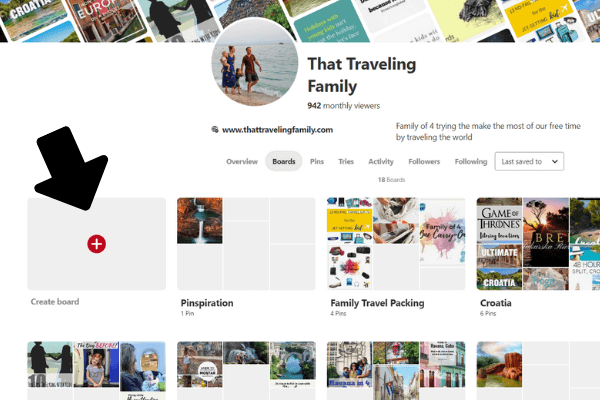
If you’re completely new to Pinterest, start by creating a few boards. I usually create a new board for each location. Depending on the size of the place, I sometimes do it by city, and sometimes by country. I also keep boards for things like packing guides and family travel tips.


Start Pinning
It’s easy to search Pinterest for a specific location. Start with something general like “Idaho travel”. Then just start pinning every picture that looks interesting. This is the preliminary work, so pin everything and you can weed things out later. Not every pin will lead to a website with information, and some are labeled for the wrong region, but you can figure that out later. I’ve made sure to vet all of the pins on our Pinterest page to make sure the beautiful photos lead to useful blogs. You can check our boards out here.
Add the Pinterest Extension
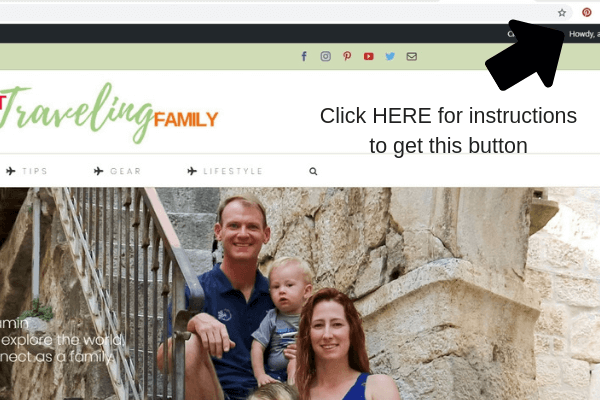
If you haven’t already, add the Pinterest extension to your browser. This will allow you to pin websites and photos you find online so that you can find them on your Pinterest boards later.
Follow the “Pin” Links
This is my second phase of planning, where I click on the pins to go to the websites and read the blogs associated with the photos. Some are useful and some aren’t, but even the ones that aren’t useful can give you ideas of other places to search. For example, I found Kravice Falls in Bosnia by pinning a photo of the falls with only the description “Waterfall Bosnia”. So then I went to Pinterest, searched for waterfalls in Bosnia, and several pins popped up leading me to the name.
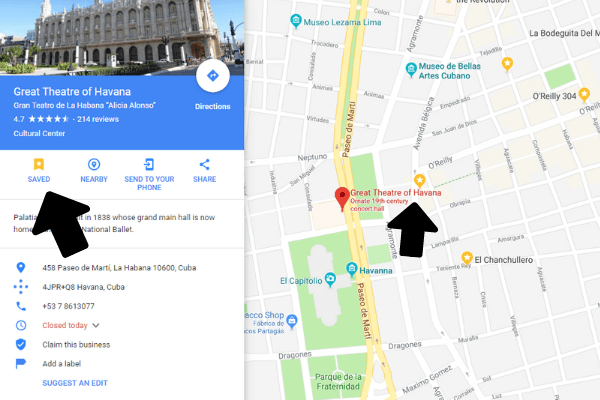
Save places on Google Maps
As you read through the blogs, if you find a place that looks interesting, save it on Google Maps.
Sort your Pins
I delete mislabeled pins to keep my boards clean and useful for planning, but others like to keep all the pictures for future inspiration. That’s your call, but you can move the most useful pins to the top of the boards.
Follow People for Future Planning
Pinterest is a social platform. Many of the pins that you find and love will be from bloggers that are producing content on other places you may want to visit someday. So, if you find a blog that is useful, follow that blogger on Pinterest. Many other people keep really useful boards full of travel inspiration, so follow anyone pinning information that you like. You may find your next dream trip from a pin that shows up on your homepage.
Then take all of that pinning and turn it in to an itinerary!
PIN IT!
About the Author: Kristin Young